


Nano
9BDense
OSWorld-Verified78.9%
WebArena-Verified67.2%
WebTestBench F148.0%
View on Hugging FaceNORTHCUA / COMPUTER USE, THROUGH EXPERIENCE
Agents that turn intent into action. Across your desktop, across the web.
NorthCUA is an integrated computer-use system that turns natural-language goals into work across desktop applications and the web. Agents interpret interfaces, coordinate actions over long workflows, preserve context and intermediate progress, and check the resulting files or software state against the original request.
The NorthCUA Harness connects workspace preparation, sustained execution, outcome inspection and record preservation. The Experience Flywheel constructs executable tasks and curates assessed trajectories, with reusable skills and verified milestones supporting collection on difficult tasks. Broad GUI mid-training, verified long-horizon supervised fine-tuning and joint desktop–web reinforcement learning turn this experience into stronger policies.
Built on Qwen3.5, the Nano (9B), Mini (35B) and Pro (397B) family spans GUI grounding, desktop execution and web interaction. NorthCUA-Ultrafast explores a lower-latency path: select finite actions directly, while preserving native generation for open-ended outputs.
| Model | ScreenSpot-Pro | OSWorld-G | OSWorld-Verified | WebArena-Verified | OSWorld 2.0 | WebTestBench |
|---|---|---|---|---|---|---|
| NorthCUA-Pro | 93.3 | 91.0 | 88.6 | 73.9 | 66.8 | 60.3 |
| Qwen3.8-Max | 84.5 | 71.6 | 86.1 | 66.8 | 46.7 | 52.3 |
| Kimi-K3 | 67.7 | 73.8 | 84.8 | 71.6 | 58.3 | 52.4 |
| DeepSeek-V4.1-Flash | 60.1 | 60.5 | 71.7 | 67.5 | 54.3 | 50.1 |
| GLM-5.3-Flash | 56.7 | 68.8 | 84.7 | 65.8 | 48.7 | 53.1 |
This film could not load. Retry, or open the original video below.
Ruby Heart GeoGebra 0:30 FILM
A mathematical heart with pulse, depth, colour and a linked moving section.
This film could not load. Retry, or open the original video below.
Silicon Atlas Calc + LabPlot 0:30 FILM
Five editable plots that keep passing, failing and unknown operating points visible.
This film could not load. Retry, or open the original video below.
Blender Inkscape + Blender 0:30 FILM
A silver-and-glass craft, an opening iris, and an editable scene behind every frame.
This film could not load. Retry, or open the original video below.
CMOS Inverter Virtuoso + Spectre 0:30 FILM
Build an inverter, repair a subtle GUI-state mismatch and inspect its operating point.
This film could not load. Retry, or open the original video below.
Zuma GAMEPLAY / SCREEN + MOUSE 0:30 FILM
Observe the board, choose a marble and continue through the chain.
NorthCUA-Ultrafast selects finite actions directly and calls the original generator when open-ended content is needed.
This film could not load. Retry, or open the original video below.
Ultrafast / Desktop SAFARI + MAPS + TEXTEDIT + PREVIEW 0:23 FILM
Plan 48 hours in Kyoto, locate places on the map, and export a Chinese travel brief as a PDF.
This film could not load. Retry, or open the original video below.
Ultrafast / Web BROWSER / FRONTEND TESTING 3:11 FILM
A browser-testing demonstration across task views, filters and editable application states.
One connected system for execution, experience production and staged learning. Better policies return to real software.
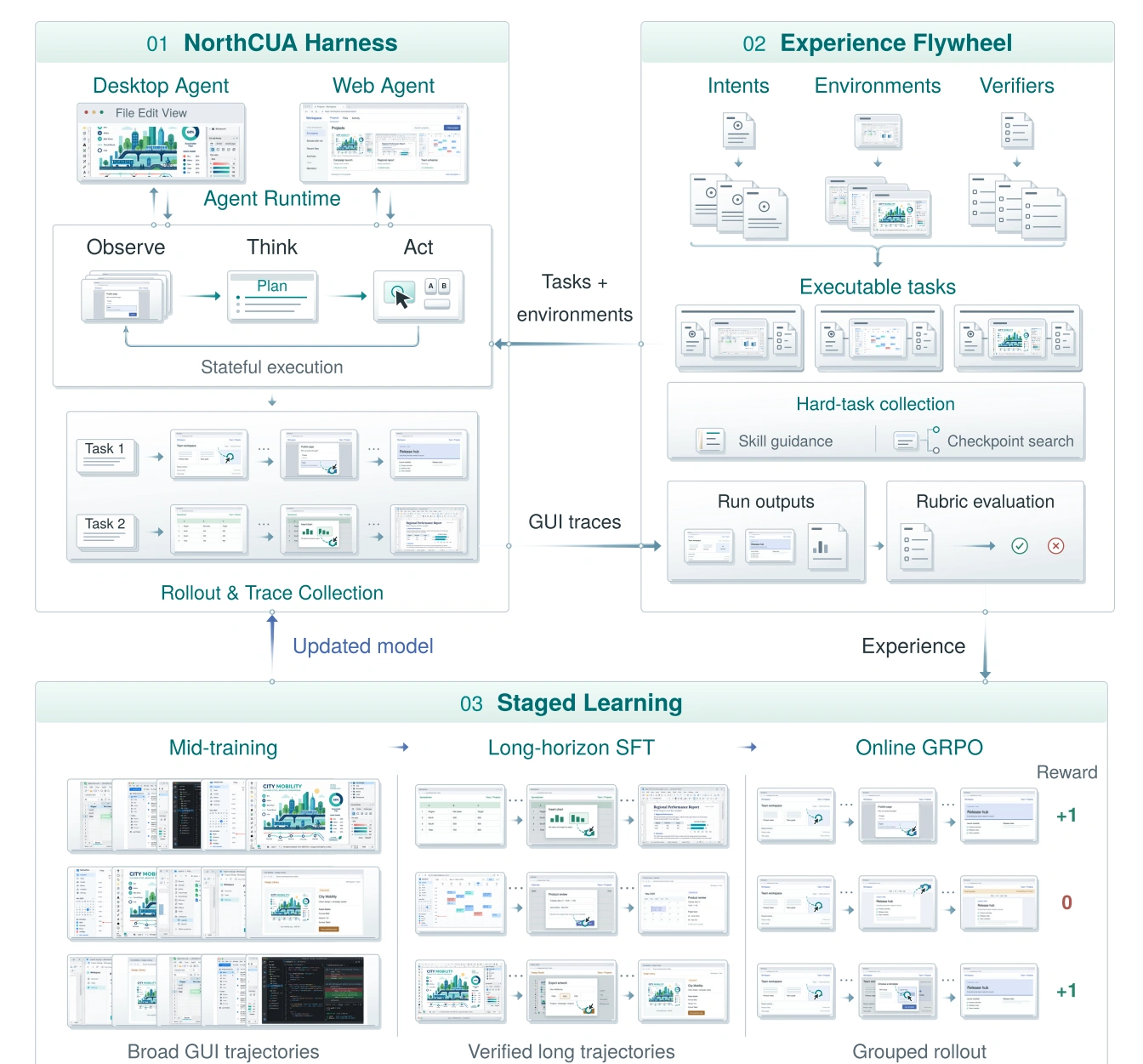
Prepare the workspace, preserve context through long tasks, inspect the result, and retain the record. A shared execution foundation for desktop and web.
Meet the Harness ↗Scale intents, environments and verifiers into executable tasks. Curate assessed trajectories, using reusable skills and verified milestones to collect experience on difficult tasks.
Broad GUI mid-training, verified long-horizon SFT, then joint desktop–web reinforcement learning. Experience becomes an updated policy for the next interaction.
Applications, task files and a clear request.
Observe, act and retain useful context.
Inspect the result while the original workspace is alive.
Retain traces, artifacts and assessments.
Release the workspace; keep the record.
 ENLARGE FIGURE ↗
FIGURE 04
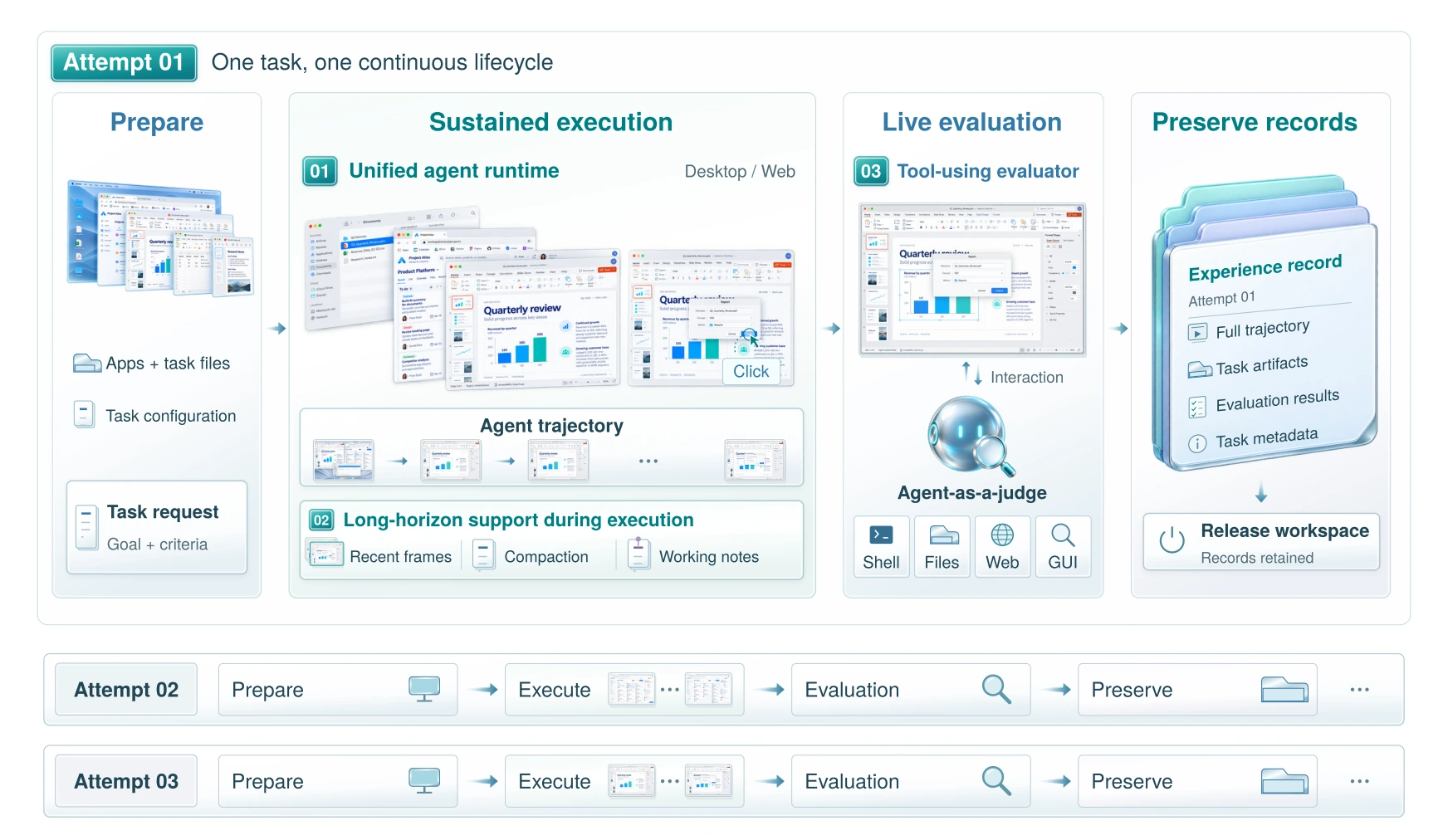
One lifecycle takes desktop and web tasks from workspace preparation through sustained interaction, outcome inspection and record preservation.Prepare, execute and inspect desktop or web tasks, then preserve the complete record.
Bind the request, input files and initial workspace.
Act across desktop and web while retaining observations and history.
Inspect the live state; save trajectories, artifacts and results before release.
Figure 4. NorthCUA Harness lifecycle.
 ENLARGE FIGURE ↗
FIGURE 11
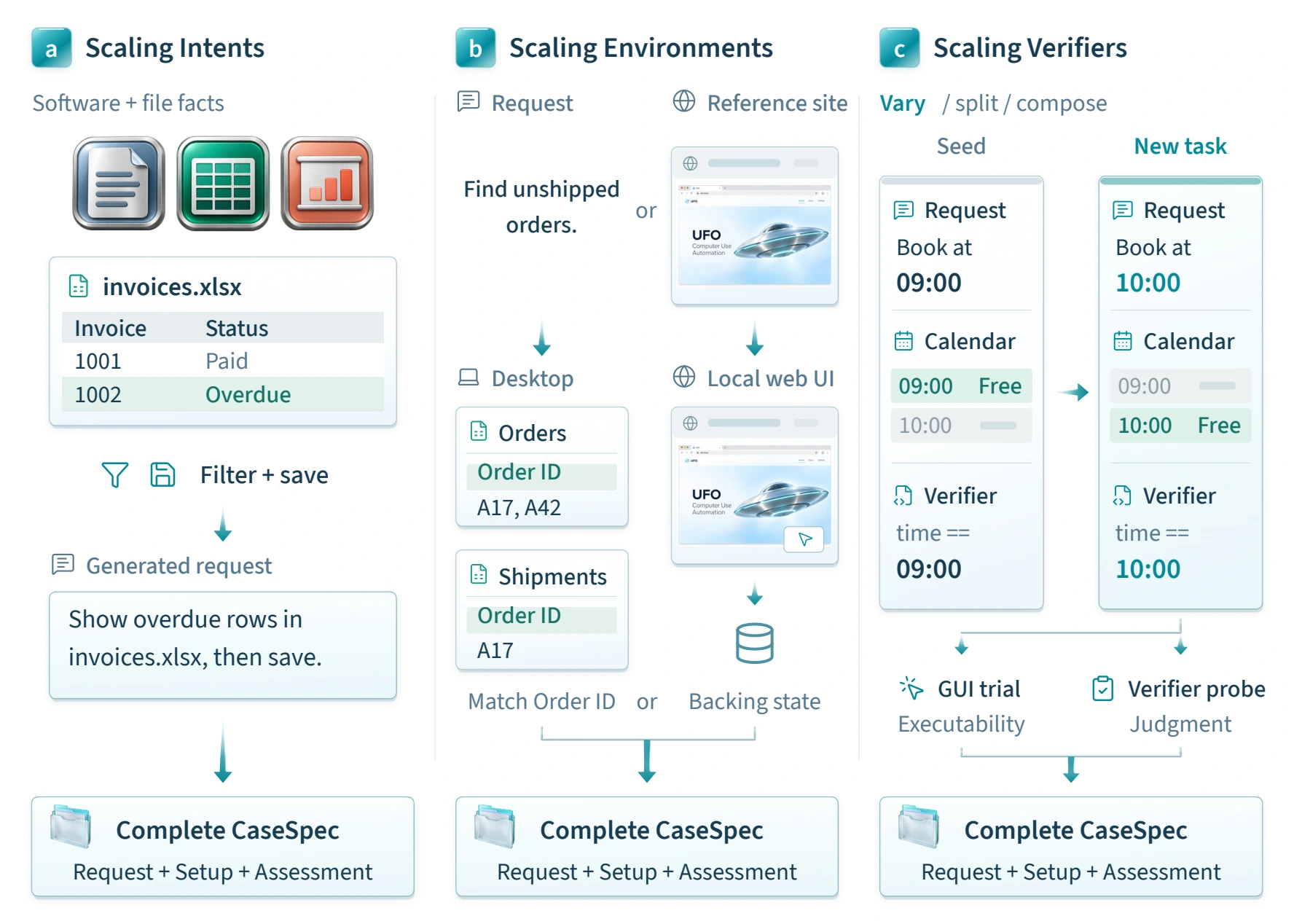
Three complementary routes each bind a request, an initial environment and an outcome assessment. They start from available software, sourced requests or tasks with executable checks.Bind each request to a usable environment and a way to check the outcome.
Derive requests from application functions, files and website content, keeping each goal grounded in available functions and facts.
Prepare files and applications for sourced requests, or reconstruct reference website interfaces and backing state to provide a usable starting environment.
Adapt requests, setup and checks together; GUI trials and result probes test execution and verdicts.
Figure 11. Three task-construction routes.
 ENLARGE FIGURE ↗
FIGURE 22
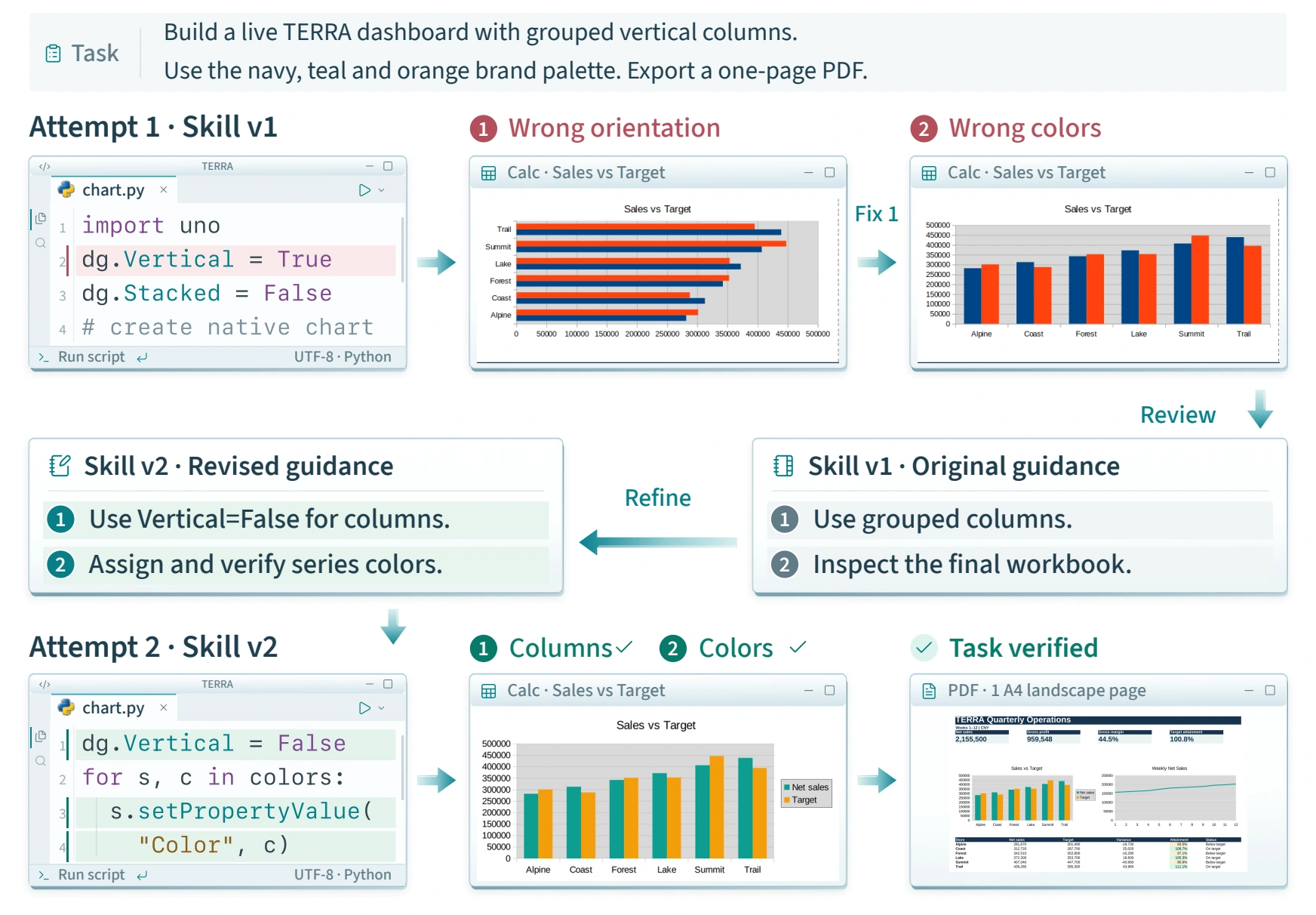
In the selected TERRA dashboard case, failed checks become operating guidance that a fresh attempt can reuse. The figure follows chart orientation and series colors from exploration to verified reuse.Use the selected TERRA case to turn failed checks into reusable guidance for chart orientation and colors.
The first attempt fixes chart orientation but fails the palette check.
Skill v2 records the column-orientation setting and explicit series colors, checked through property readback and visual inspection.
Starting from the original input in a fresh workspace, the revised skill passes all 26 final checks.
Figure 22. Skill refinement in the TERRA dashboard case.
 ENLARGE FIGURE ↗
FIGURE 24
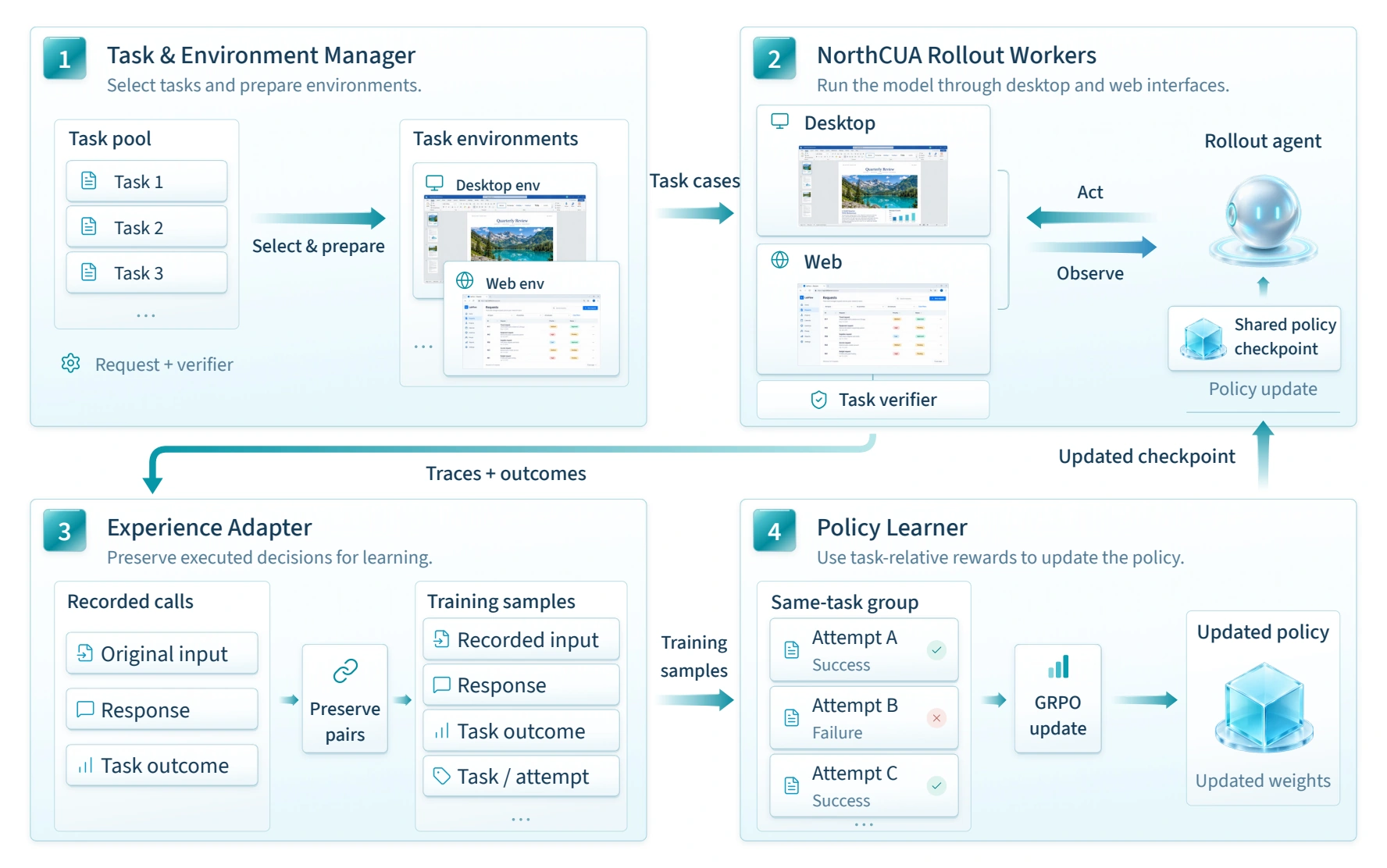
Isolated desktop and web workers generate fresh attempts; verified outcomes feed learning, and an updated checkpoint returns to the same execution system. Execution and training share the task and assessment interfaces.Fresh desktop and web attempts connect verified outcomes to learning, then return an updated checkpoint to the workers.
Run tasks with verifiers in independent desktop or web workspaces.
Attach outcomes before release, preserving inputs, responses and attempt identity.
GRPO compares valid attempts with the same task, initial state and verifier.
Figure 24. Joint desktop–web agentic reinforcement learning.
 ENLARGE FIGURE ↗
FIGURE 31
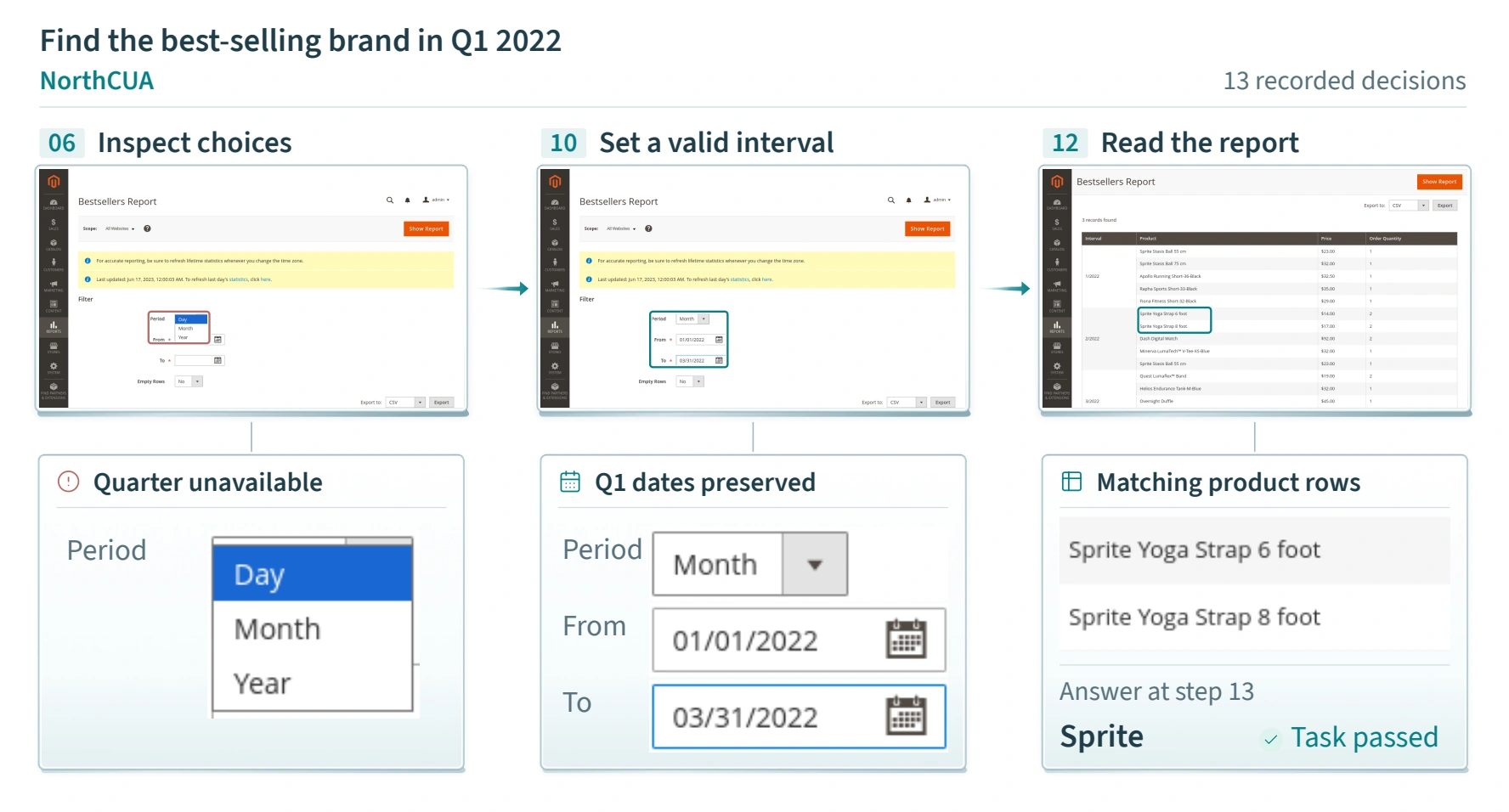
When Quarter is unavailable, use Month with the exact Q1 dates.Use Month with the original Q1 dates.
Inspect the dropdown to confirm Quarter is absent.
Switch to Month while retaining the exact Q1 date range.
Answer Sprite after checking rows; the selected 13-decision Pro attempt passes evaluation.
Figure 31. Recovering from an unavailable browser action.
 ENLARGE FIGURE ↗
FIGURE 32
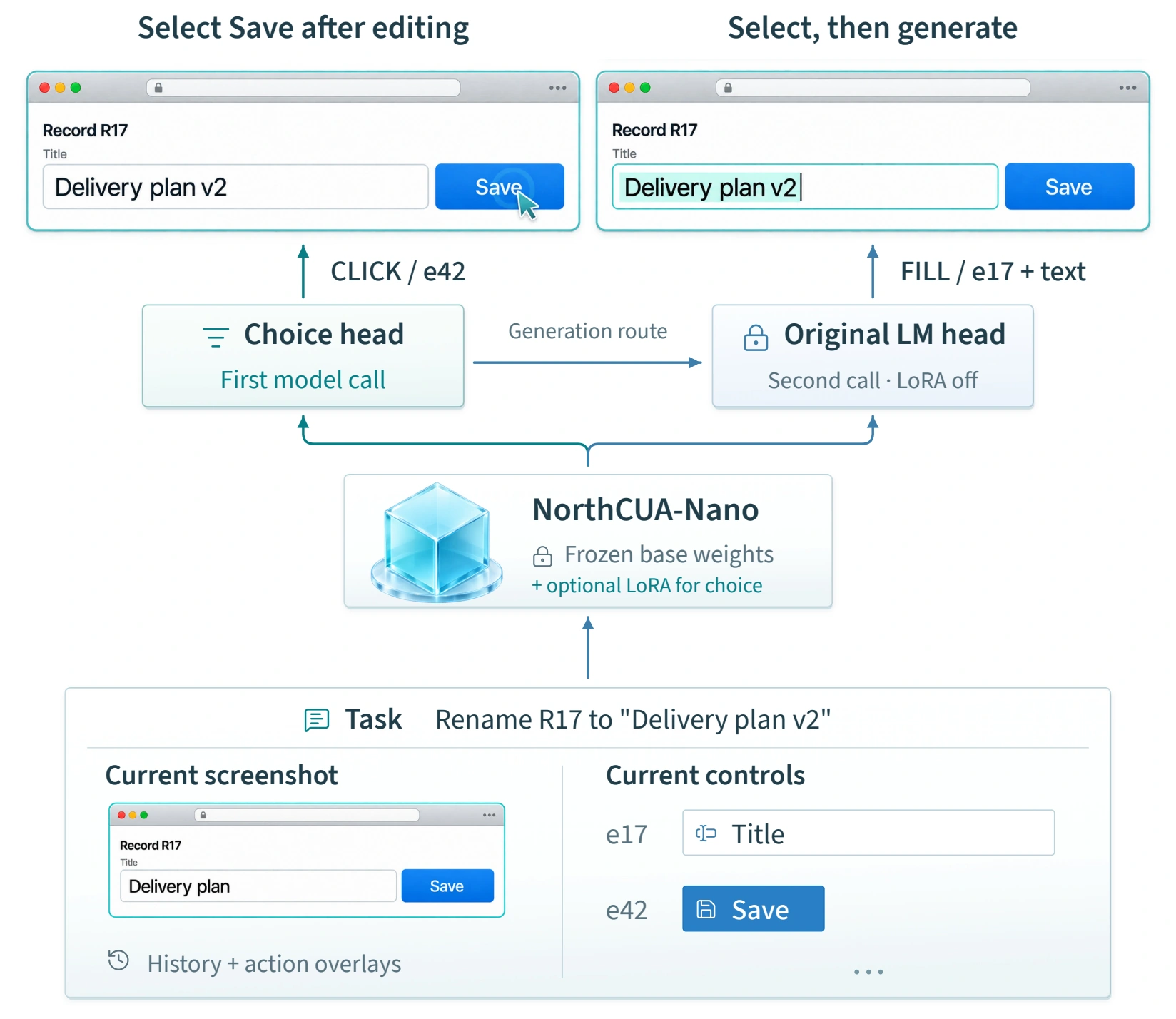
NorthCUA-Ultrafast adds a choice head to pre-RL Nano. It separates routine finite selections from open-ended generation, keeping the original model available whenever an action needs content or cannot be selected directly.A choice head complements pre-RL Nano while preserving the original generator.
Bind candidate controls to the latest valid observation; historical references cannot be executed as live targets on a changed page.
One backbone pass scores the operation and target. Supported clicks, hovers and checkbox changes become tool calls without token-by-token decoding.
Open-ended outputs use a second full-model call with the original prompt and fresh cache. Optional LoRA is enabled for classification and disabled for generation.
Figure 32. Choice-based Web execution.
Three scales. A shared foundation in computer use. Choose the balance that fits your research.
9BDense
35B3B active
397B17B active
Licenses & creditsApache-2.0 · Harness code